Sync an Existing OKF Wiki from Git
Use Git · OKF Sync when a Git repository already contains an Open Knowledge Format (OKF) wiki. Synth copies the authored wiki into an existing Project, keeps it current, and indexes it together with the Project's other knowledge.
Open the wiki's index.md on GitHub.com or GitLab.com, copy the full browser
URL, and paste it into Synth. For example:
https://gitlab.com/example/team-wiki/-/blob/main/knowledge/index.md
Synth gets the repository, branch, and wiki folder from that one URL. You do
not need to enter root or mount for the normal setup.
No LLM is involved. Synth does not extract, summarize, rewrite, link, lint, or generate these pages. It validates and copies their exact authored bytes.
The synced wiki does not become a second knowledge base. Its concept pages and the Project's existing pages are published in one Project snapshot and searched together through Explore, MCP, REST, the CLI, and the SDKs.
You Usually Do Not Need root Or mount
An OKF wiki is a folder containing an index.md file. That file marks the
folder as the start of the wiki.
Pasting the index.md URL tells Synth which wiki folder to sync. The root
setting is the manual way to provide that same folder. Use it only in advanced
configuration when you cannot or do not want to paste the file URL.
team-wikis/
└── handbooks/
    └── security/          <- the wiki folder
        ├── index.md       <- marks this as an OKF wiki
        └── guides/
            └── access.md
| Term | What it means | What you normally do |
|---|---|---|
index.md | The file that identifies an OKF wiki | Paste its browser URL into Synth |
root | The wiki folder's path inside the repository; in this example, handbooks/security | Leave it empty in the UI; Synth finds it from the URL |
mount | The destination folder inside your Synth Project | Leave it empty unless you need a custom destination |
root describes the source. mount describes the destination. They are not
the same path, and neither creates a separate knowledge base.
The Short Version
remote Git repository at an exact commit
  -> select and validate the complete wiki folder
  -> calculate an exact merge plan
  -> merge only safe, watcher-owned paths
  -> activate one sealed Project snapshot
  -> retrieve everything through the existing Project
There are no LLM calls in this path. Sync does not require an LLM provider, consume model tokens, or use a model budget.
What Deterministic Means
Each check resolves the watched branch to an immutable Git commit. For the same commit, OKF files, configuration, and target Project snapshot, Synth produces the same ordered change plan and digest.
Synth preserves the authored OKF bytes. It validates the complete wiki folder and uses file paths, Git object identity, and content hashes to decide what changed. It does not ask a model to interpret or regenerate the wiki.
The remote authoring process can still use an LLM. Determinism starts at the immutable Git revision that Synth observes.
How The Merge Protects Existing Knowledge
Remote OKF sync adds the wiki to the selected existing Project:
- unrelated Project pages remain unchanged;
- an identical page already at the target path is reused without rewriting it;
- missing pages are created;
- later updates modify only paths owned by that watcher;
- different existing content is a conflict and blocks publication rather than being silently overwritten;
- removals require a complete remote snapshot and affect only watcher-owned paths;
- a failed fetch, validation, or publication leaves the last trusted Project snapshot active.
Synth stages and verifies the complete result before activating it. A watcher reports success only after the matching Project snapshot and retrieval index are active.
What Users See In Explore
OKF concept pages appear in normal Project search results. They use the same revision-bound page reads, excerpts, provenance, access control, and retrieval APIs as existing Project knowledge.
Structural index.md and log.md files and safe supporting assets remain part
of the synchronized OKF tree, but they are not searchable concept pages. Watcher
health and remote freshness stay on the Watchers screen; Explore continues to
serve the last successfully activated snapshot.
Set It Up In The UI
The normal UI flow is:
- Open Watchers → New Watcher → Git.
- Choose Sync an existing OKF wiki.
- Paste the wiki's
index.mdbrowser URL. A repository or folder URL also works. - If Synth finds more than one wiki, choose the one you want.
- Review the exact create, update, reuse, move, remove, and conflict counts.
- Select Start continuous sync.
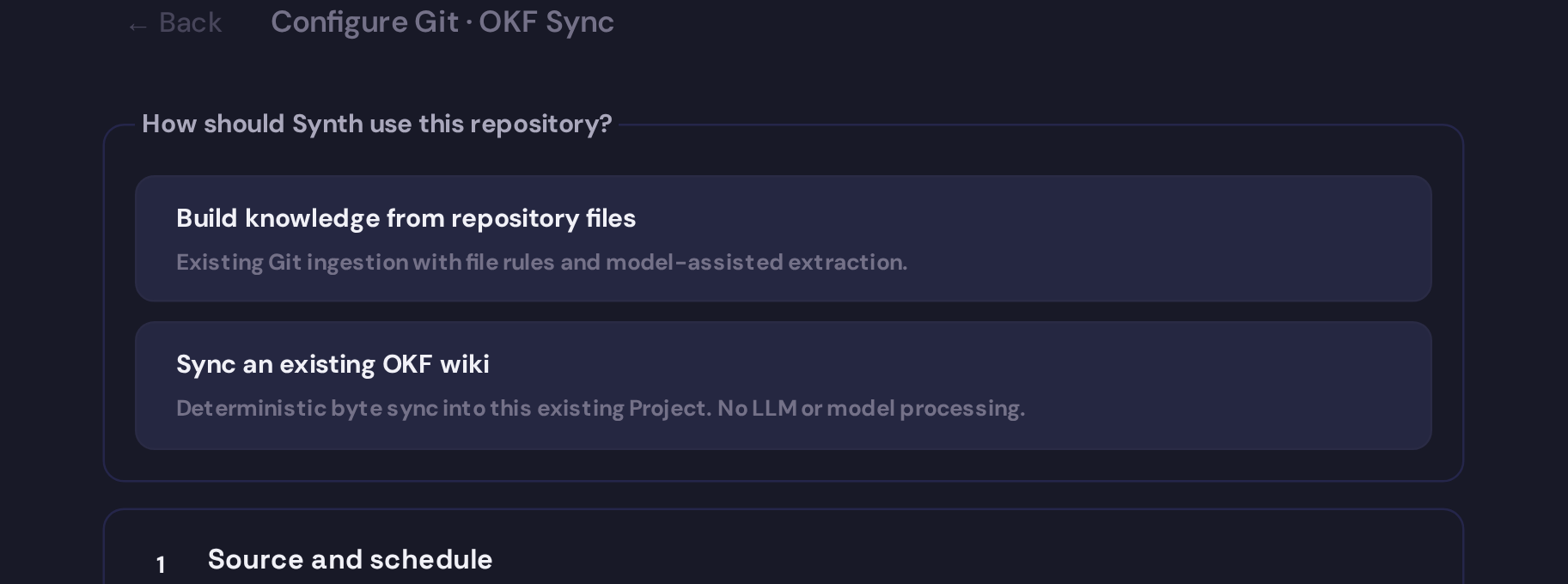
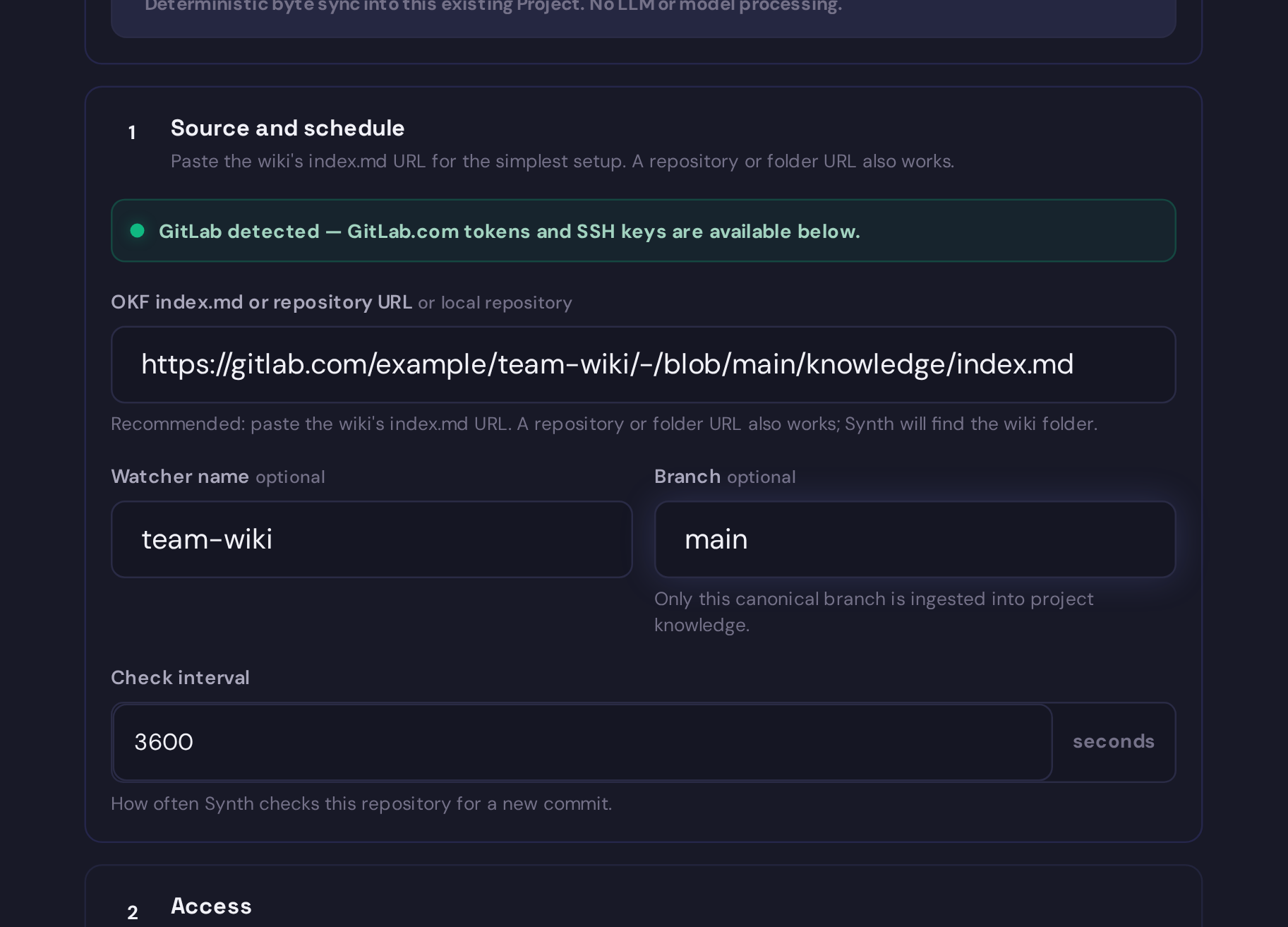
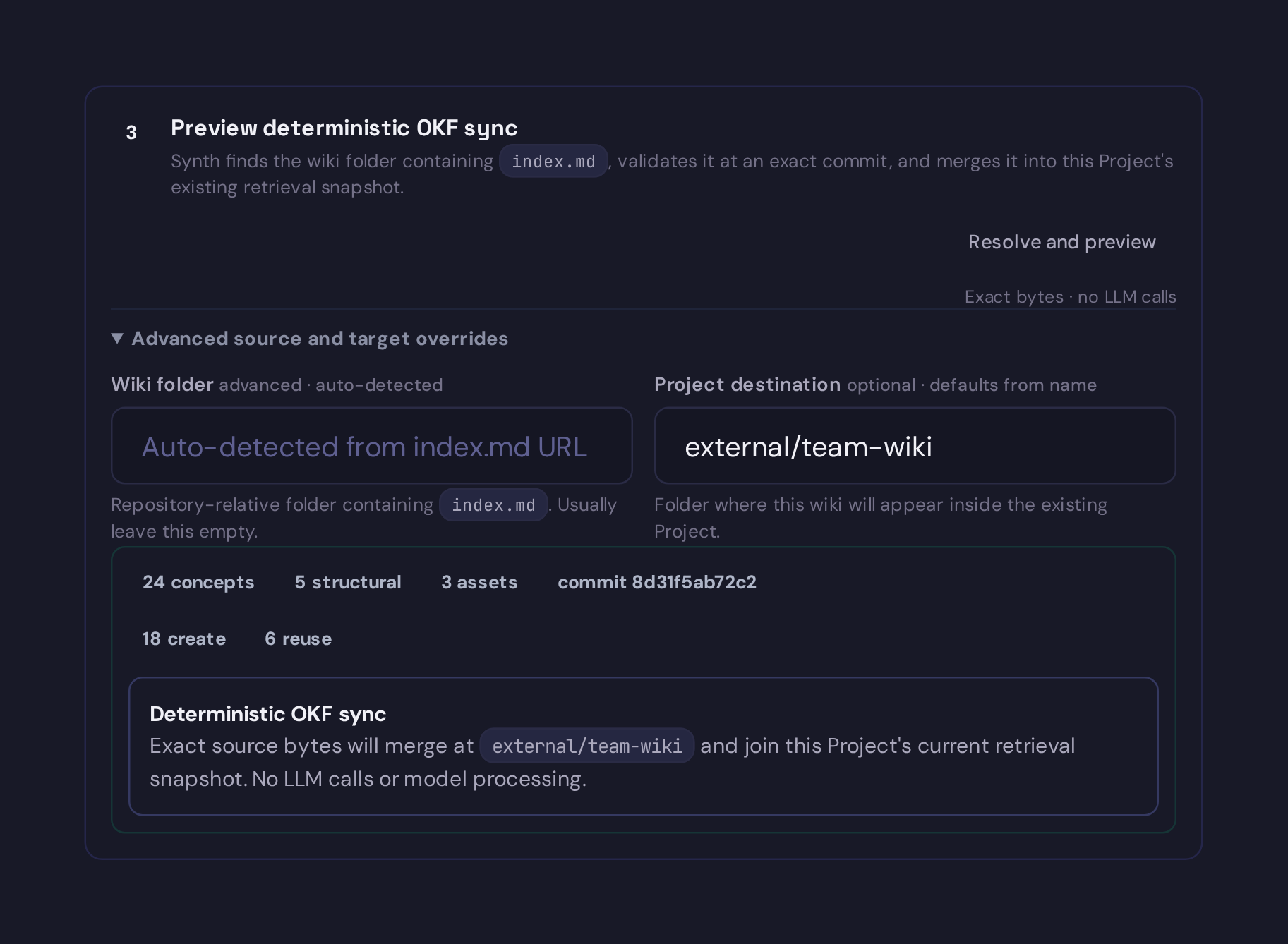
Git remains the source type. The first Git-specific choice distinguishes
Build knowledge from repository files from Sync an existing OKF wiki.
After the second choice is selected, the setup heading and watcher card say
Git · OKF Sync. Synth does not create a separate git-okf watcher type.
Synth resolves an exact commit, validates the complete wiki folder, and shows the merge plan before Start is enabled. Changing the source, watcher name, branch, wiki folder, Project destination, or credential invalidates the preview. If the Project changes after preview, the first job stops as Preview stale; it never applies a different plan silently.
Which URL should I paste?
| URL you paste | What Synth does |
|---|---|
An index.md file URL — recommended | Selects the wiki containing that file |
| A GitHub.com or GitLab.com folder or tree URL | Checks that folder for an OKF wiki |
| A repository URL | Finds the wiki automatically; if there are several, asks you to choose |
For example, pasting this file URL selects handbooks/security without making
you type the path separately:
https://github.com/example/team-wikis/blob/main/handbooks/security/index.md
If a repository contains several wikis and you paste only the repository URL, setup shows Choose the OKF wiki. Each option includes its folder, OKF version, and file counts. Synth never guesses. Selecting an option immediately previews that wiki. To sync two wikis from the same repository, create two watchers; each gets its own Project destination.
GitHub.com and GitLab.com repository, tree, and blob URLs are accepted. Query parameters copied from their browser UI are discarded before source validation. Slash-containing GitLab branch names require an explicit branch override.
For a single repository on self-managed GitLab, paste the browser link and
select Use HTTPS clone URL. Enter the branch shown in GitLab if the source
form asks for it. You can also copy Clone with HTTPS directly from GitLab.
With a direct clone URL, leave Branch empty to use the repository default
and choose the wiki folder if Synth finds several. For a private repository,
select a saved GitLab Personal Access Token with read_repository. The
operator must enable SYNTH_ALLOW_ARBITRARY_GIT_URLS=1 as described in
Watchers.
Configuration As Code
The simplest CaSC configuration also accepts an index.md browser URL:
watchers:
  team-wiki:
    type: git
    repo: https://gitlab.com/example/team-wiki/-/blob/main/knowledge/index.md
    mode: okf-sync
Synth derives branch: main and root: knowledge from the URL. A plain
repository URL is also enough when the repository contains exactly one OKF
wiki.
Use root only when you want to select a wiki folder explicitly:
watchers:
  security-wiki:
    type: git
    repo: https://gitlab.com/example/team-wikis.git
    mode: okf-sync
    root: handbooks/security
    mount: external/security
Here, root is the source folder containing index.md. mount is where those
files appear in the Synth Project. If the source index.md is at the top level
of the repository, use root: .. If mount is omitted, Synth uses
external/<watcher-id>.
For a private repository, add a saved credential reference. Other optional
advanced overrides are branch, interval, and auto_start. Derived defaults,
trust bindings, preview fingerprints, and deletion safety policy remain internal
Synth state.
Existing Git watcher configuration remains compatible. A Git watcher without
mode: okf-sync continues to use ordinary repository ingestion. A published
watcher cannot switch between ordinary Git ingestion and OKF sync in place;
changing content behavior, repository, branch, wiki folder, or Project destination
requires a new watcher. Poll interval, auto-start, and credential reference
remain editable.
Do not add files, patterns, a group/organization source, or a model cost
policy. OKF sync always validates and mirrors one complete wiki folder. These
fields are rejected rather than ignored.
Watcher And Explore UX
The saved card and details panel say Git · OKF Sync. They show observed and published commit, wiki folder, Project destination, active Project snapshot, action counts, and the explicit fact Model processing: None — deterministic byte sync. Ordinary Git cards continue to say Git and retain file-rule and cost controls.
Select Explore synced knowledge to open Explore with a visible mount-scope
chip. Search is then sent with filters.path_prefix. Clear the chip to search
all Project knowledge, including both existing and synchronized pages. Copy for
agent records the active path scope. Exact evidence can expose an
adapter-approved, credential-free, exact-commit Open source link for public
GitHub.com or GitLab.com sources.
Freshness And Recovery
The watcher records the source commit it observed, the commit it successfully published, and the active Project snapshot. An unchanged commit is a no-op and does not create a new Project snapshot or rebuild the retrieval index.
If authentication, network access, OKF validation, conflict checks, indexing, or checkpoint persistence fails, the Watchers screen shows the affected state and a recovery action. Explore, MCP, REST, CLI, and SDK reads continue using the last successfully activated Project snapshot. A source failure never implies that remote files were deleted.
Large removal plans stop in Approval required and display the exact plan digest. Approval is one-use and applies only to that digest; if the source or Project changes, Synth requires a new review. Conflicts, target drift, invalid OKF, and incomplete source snapshots also block publication while the last trusted Project snapshot stays searchable.
Rollout pause and rollback
Remote OKF sync is available by default. An operator can pause the capability for the whole deployment and restart Synth with:
SYNTH_ENABLE_GIT_OKF_SYNC=0
While paused, Synth rejects new OKF-sync resolve, preview, create, start, check, and removal-approval operations. The setup choice is visibly unavailable. It does not delete or rewrite watcher configuration, the watcher-owned files, or the last sealed Project snapshot. Existing knowledge remains searchable and the Watchers screen continues to show the source, mount, published revision, and the fact that synchronization is paused by deployment policy.
Set SYNTH_ENABLE_GIT_OKF_SYNC=1 (or remove the variable) and restart the web
and ingestion-worker processes to resume. The next successful check compares
the exact current Git commit with the preserved published revision; it does not
re-import the wiki blindly.
Troubleshooting
| Watcher state | Meaning | Safe action |
|---|---|---|
| Stale | The source cannot currently be fetched or the selected revision is not valid OKF. | Repair network, authentication, branch, or source content, then run a check. The last published snapshot remains active. |
| Preview stale | Git or the target Project changed after preview. | Preview again and review the new exact plan. |
| Approval required | A complete source revision removes more watcher-owned content than policy permits automatically. | Review the exact removal count and digest, then approve that one plan. |
| Conflict | A target path contains different unowned content. | Move either source or Project content; Synth will not overwrite it. |
| Needs attention | Watcher-owned target bytes drifted, configuration identity changed, or publication could not finish safely. | Restore the owned path or create a new watcher for a different repository, wiki folder, or Project destination. |
| Rollout paused | SYNTH_ENABLE_GIT_OKF_SYNC=0 is active. | Re-enable the capability and restart web and worker processes when ready. |
For every failure state, verify the Published revision and Project snapshot on the watcher card before investigating the newer observed revision. Retrieval continues from the published snapshot, not from a partial or failed candidate.
Security And Current Limits
- Use a read-only repository credential. Synth stores a credential reference, not a secret, in watcher configuration and CaSC export.
- Only one repository and one complete declared OKF wiki folder are synchronized per watcher. File filters, partial wiki folders, organization/group sources, and model cost settings are rejected in this mode.
- Repository, branch, wiki folder (
root), Project destination (mount), and content mode are immutable after first publication. Create a new watcher to change that identity. - Source URLs are resolved and validated server-side. Browser URLs do not grant host trust, redirect permission, private-network access, or TLS exceptions.
- Supporting assets are stored as inert content-addressed objects. They are not executed, indexed as pages, or exposed through exact-page reads.
- Self-managed GitLab uses the operator-enabled generic Git adapter with a clone URL. The setup form can suggest that URL from a GitLab browser link. API and CaSC configuration require the clone URL. GitLab provider API features remain unavailable on self-managed hosts.
- Polling is the source of truth. Webhook wake-ups are not part of the current contract.
OKF Sync Versus Ordinary Git Ingestion
| Remote OKF sync | Ordinary Git ingestion | |
|---|---|---|
| Input | Complete existing OKF wiki | Raw repository files |
| Page handling | Preserve authored pages exactly | Extract knowledge from source material |
| LLM | Never used | May be used by configured ingestion agents |
| Update model | Deterministic mirror and merge | Source-grounded regeneration |
| Retrieval | Same existing Project | Same existing Project |
Use remote OKF sync when the repository already contains the knowledge pages you want agents to retrieve. Use ordinary Git ingestion when Synth needs to derive knowledge from raw documentation or source files.
Next: Explore.